
Curated UK acquisition and exclusive-licence opportunities · qualified strategic buyers
CountBuddy

Put a clearer stock count into your customers' hands.

Mobile stock counting that brings barcode identification, team counts and variance review into one clear workflow.

At a glance
Best-fit buyer
Inventory-software providers, retailers and operational service businesses.
Customer value
A clear stock-counting workflow for teams, from item lists through recount and supervisor review.
Transaction options
Software asset acquisition or a defined licence.
Included in discussion
Agreed application source, counting and import/export workflows, permitted brand assets and handover documentation.
A look inside the workflow
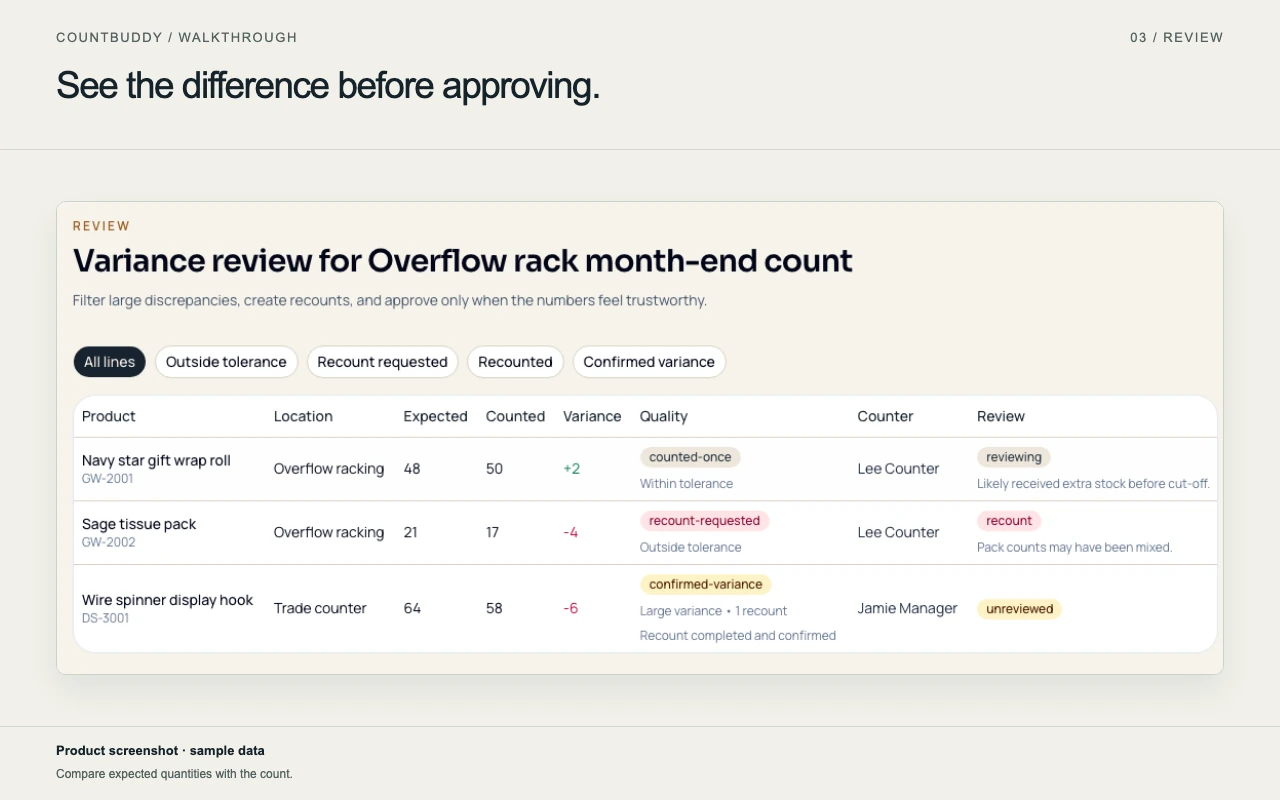
Review differences and recounts. CountBuddy variance-review screen with sample counts and review states.
CountBuddy variance-review screen with sample counts and review states. View full-size image (opens in a new tab)
Explore the three-step walkthrough ↓

The opportunity

Give stock teams a clear route from the first item to the final review. CountBuddy brings stock lists, barcode labels, mobile counts and variance review together, with recounts and supervisor oversight before export.

Short guided demo

See the workflow in action.

From CSV import to count, review and export

Actual application recording in an isolated environment. Import two fictional catalogue items, count them in a new session and export the matching review. Expected quantities were already seeded; recounts and uncounted sample rows remain visible. No final stock adjustment is shown.

Explore the workflow through product screens and fictional examples. Request a private demonstration focused on your requirements.

Prepare a count

Bring in an item list and expected quantities so the counting team starts with a clear, shared view.

Prepare a stock count. CountBuddy product walkthrough with sample stock-count data.
CountBuddy product walkthrough with sample stock-count data. View full-size image (opens in a new tab)
Illustrative example
Fictional count
Demonstration stockroom
Import
Example items A, B and C with expected quantities
Sample tolerance
2 units

Start with a small sample list to explore the workflow.

Continue with the next step below.

Record the observed quantity

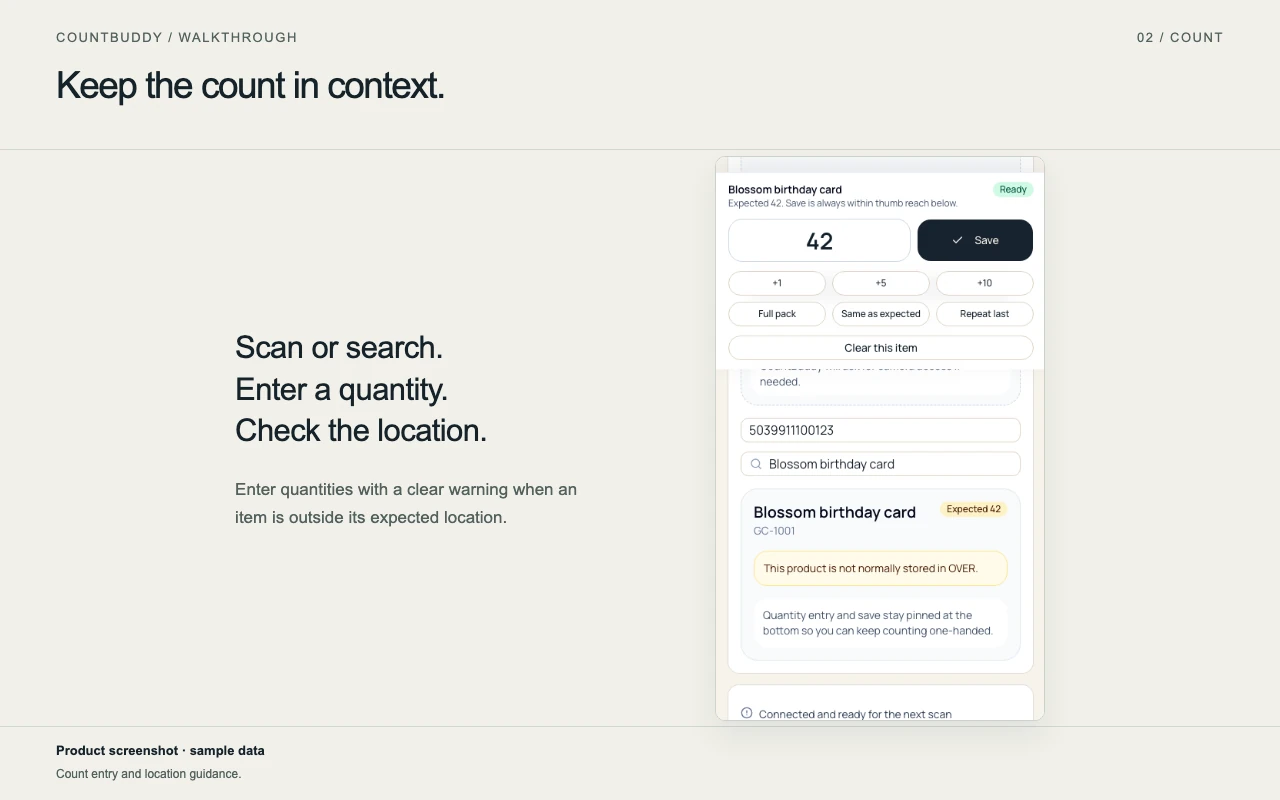
Identify each item and record the quantity on hand, keeping the count connected to the item being checked.

Record items on mobile. CountBuddy mobile counting screen with sample items.
CountBuddy mobile counting screen with sample items. View full-size image (opens in a new tab)
Illustrative example
Example item A
Expected 24 · counted 22
Example item B
Expected 12 · counted 8
Example item C
Expected 10 · counted 16

The sample counts make differences easy to follow in the next step.

Continue with the next step below.

Review the difference

Focus attention on meaningful differences, organise recounts and prepare reviewed results for export.

Review differences and recounts. CountBuddy variance-review screen with sample counts and review states.
CountBuddy variance-review screen with sample counts and review states. View full-size image (opens in a new tab)
Illustrative example
Item A: −2 units
Within tolerance
Item B: −4 units
Moderate variance
Item C: +6 units
Large variance / recount

Sample classifications at the displayed tolerance help show the supervisor review and recount workflow.

Your acquisition or licence

A clear scope from the outset.

Agree the assets, rights and delivery milestones before commitment, with the detail set out in the signed schedule.

View included assets, exclusions and conditions

Application source

Proposed inclusion
The agreed CountBuddy application source, interface, data schema, tests and documentation for imports, barcode labels, counting, tolerance/recount, supervisor review and CSV export.
Excluded or conditional
Unrelated portfolio code, customer-specific IP and any third-party component whose licence does not permit the proposed use are excluded.

Offline and data workflows

Proposed inclusion
Existing offline-related implementation and documented import/export formats within the agreed source baseline.
Excluded or conditional
No universal offline guarantee, supported-device promise or compatibility with an unnamed inventory system. Buyer acceptance must test the intended environment.

Brand and deployment

Proposed inclusion
Specified seller-owned CountBuddy brand assets, deployment instructions and any expressly scheduled transferable domain rights.
Excluded or conditional
No automatic domain, hosting, identity-provider, payment-provider or billing-account transfer. Existing providers may need new buyer accounts.

Documentation and data

Proposed inclusion
Available setup, test and handover materials, plus sanitized examples suitable for acceptance.
Excluded or conditional
No customer records, live credentials, contracts, subscription revenue or customer relationships are included by implication.

A straightforward acquisition or licence.

Discuss an acquisition or licence for your business, with a clear delivery scope, handover date and defined support period.

Explore the transaction structure that fits your business. Speak directly with the founder about the commercial fit and next steps.

Request confidential details →
Define the deal

the stock-counting workflow

A bounded acquisition or licence of the agreed CountBuddy application, with a clear import-to-review acceptance journey and practical handover.

View one-page buyer summary →

Included in the discussion

  • The scheduled application, interface, schema, tests and documentation.
  • Agreed counting, barcode, offline queue, variance and CSV-export workflows.
  • Specified permitted brand assets and deployment/handover materials.

A clear handover

Documented setup and knowledge transfer, with a fixed support period and separately scoped integrations or continuing operation.

Scope and acceptance

Agree device, offline, data-format and provider requirements, then validate the buyer's intended counting and supervisor-review journey.

Existing source and sample screens do not establish universal compatibility or complete provider acceptance. Customer-specific IP, live data, credentials and unassignable third-party rights remain outside the package.

Agree before commitment

  • Asset ownership or permitted licence use
  • Brand and domain rights
  • Buyer environment and provider setup
  • Payment, acceptance and support milestones

A proposed starting package

Rights
Acquisition of the agreed seller-owned application assets for one defined buyer environment; third-party components keep their own licence terms.
Exclusivity
Scheduled ownership transfer. A non-exclusive operator licence can be discussed as an alternative.
Handover allowance
30 calendar days after agreed workflow acceptance, capped at 20 hours, including a setup runbook, two sessions and one buyer rehearsal.
Payment structure
Proposed milestones: 40% on signed scope, 40% on agreed workflow acceptance and 20% on completed source and access handover.

Discussion terms, subject to the exact rights schedule, costed delivery scope and written agreement. These handover allowances begin after acceptance; implementation obligations and defect remedies are specified separately.

Proposed commercial scope. Final rights, price and delivery obligations are agreed in writing.

Discuss this package →